NOTE SPACE

STORES EXPERIMENT AND TRICK NOTES ABOUT COMPUTER GRAPHIC
ThreeJS
WebGL
11-12-23
Transparency in ThreeJS
One of the basic things in visual graphics is transparency. But, In the 3D rendering process, doing transparency is pretty complex. In this note, I will show you the concept of transparency in WebGL, and how to implement code in ThreeJS.
This note use ThreeJS version 157
Depth rendering process
First, I want to introduce you to the depth rendering process. Let’s check out the image below.
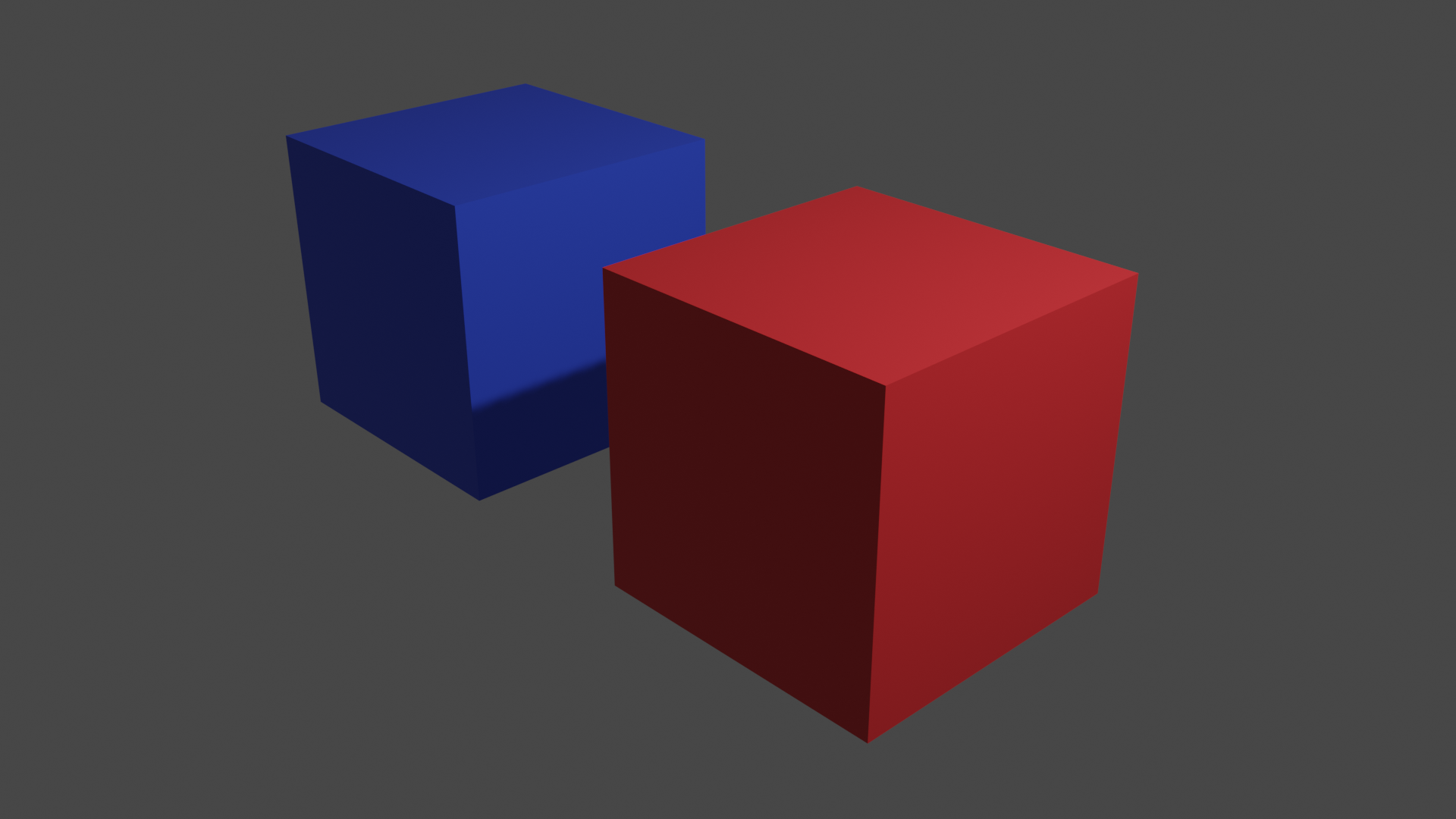
From the image above, you have 2 objects one is nearer to the screen than the other. When WebGL renders them, WebGL does it separately and then blends each object to the screen like this.
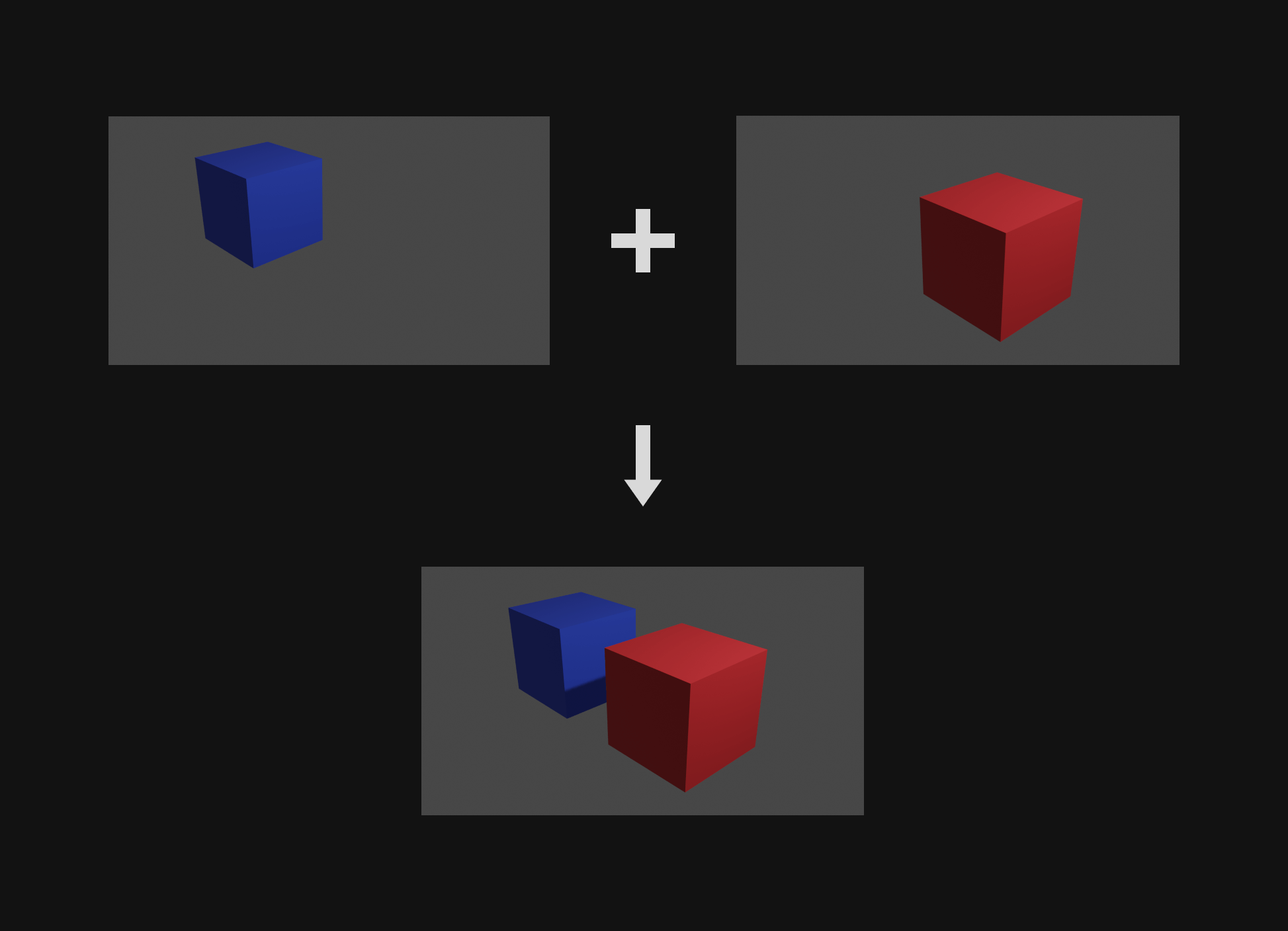
The question is how WebGL knows which one should be in the front. There are 2 methods.
By rendering order - With this method, WebGL will always render later rendered objects at the front and don’t care about the position of the objects.
Depth Testing - This is a method that is commonly used in most 3D engines. And, We will focus on this method.
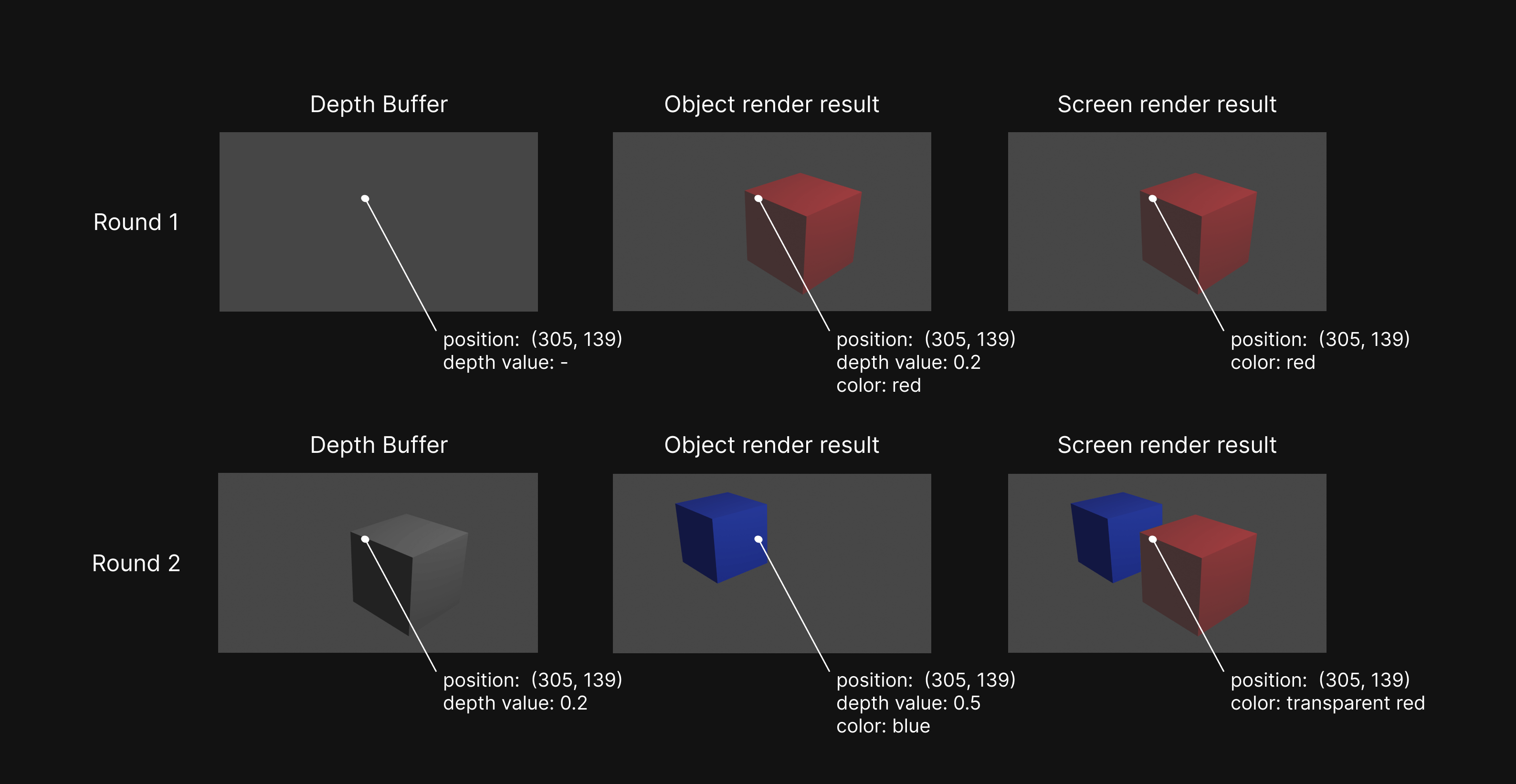
With the Depth Testing method, WebGL will decide if an object should be on the front or back by checking the Depth Buffer. Every time, you render an object on the screen Depth Buffer will store the depth of each screen pixel. Then, when you render another one, it will compare each pixel in the pixel in Depth Buffer which has the same position. It will be ignored if a pixel is farther from the screen than the Depth Buffer. But, if it is nearer, it will be rendered to the screen, and the Depth Buffer will update the depth value of this pixel. Check out the table below.
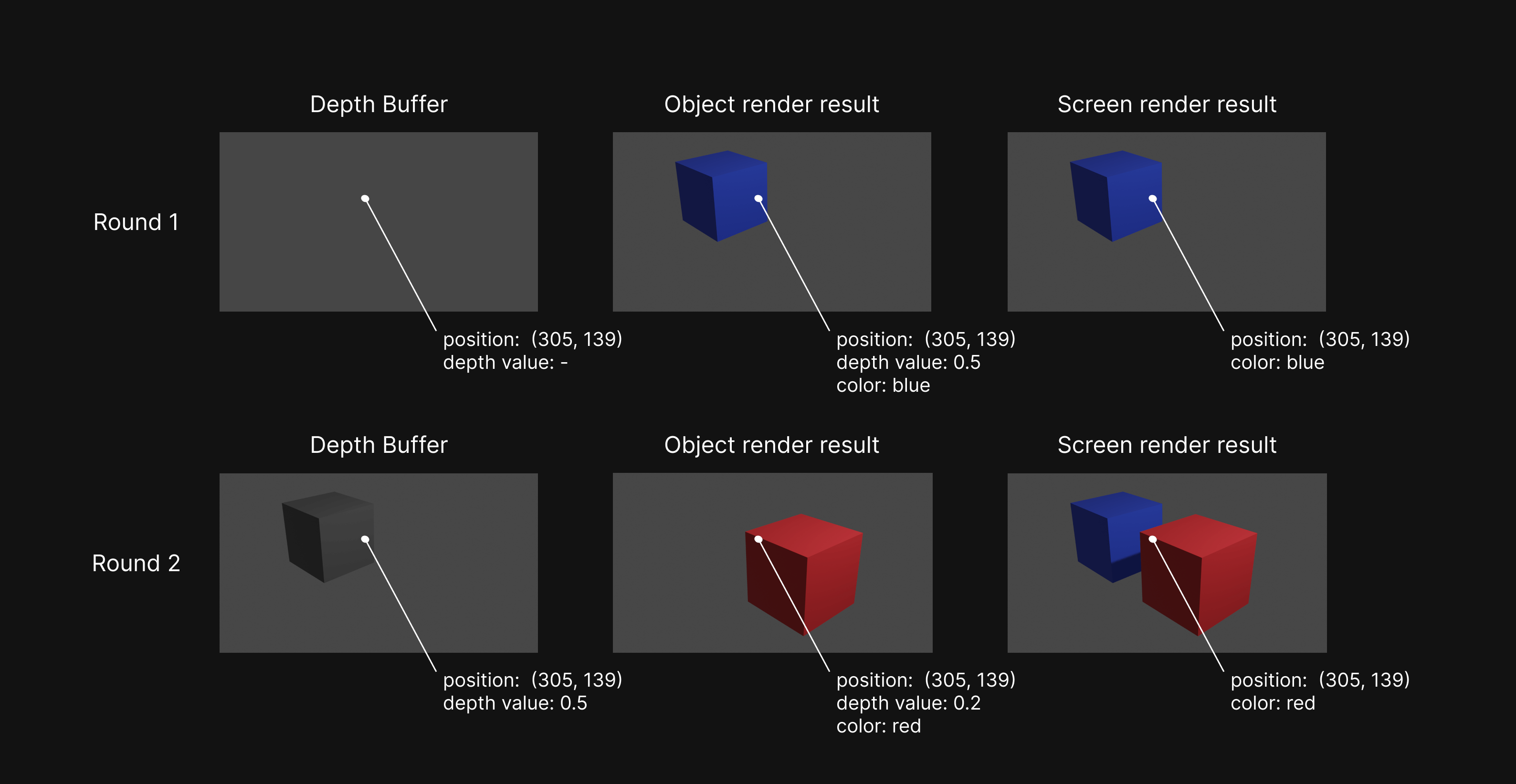
Example of how depth mape works
As you can see, at first, the Depth Buffer is empty. So, after the first object rendering, The depth buffer value will equal the first object pixel’s depth. In this case, its value is 0.5 (it’s just a dummy value not from the real process).
For round two, we need to compare the new object rendering result pixel depth to the depth buffer (0.5 > 0.2). The new depth value is less than the depth in the buffer. it means the new pixel is nearer to the screen than the old. So, WebGL decided to render a red value.
The importance of rendering order
Now, it’s time for transparent rendering. Next, I will set the red block transparent. Let’s see the result below.
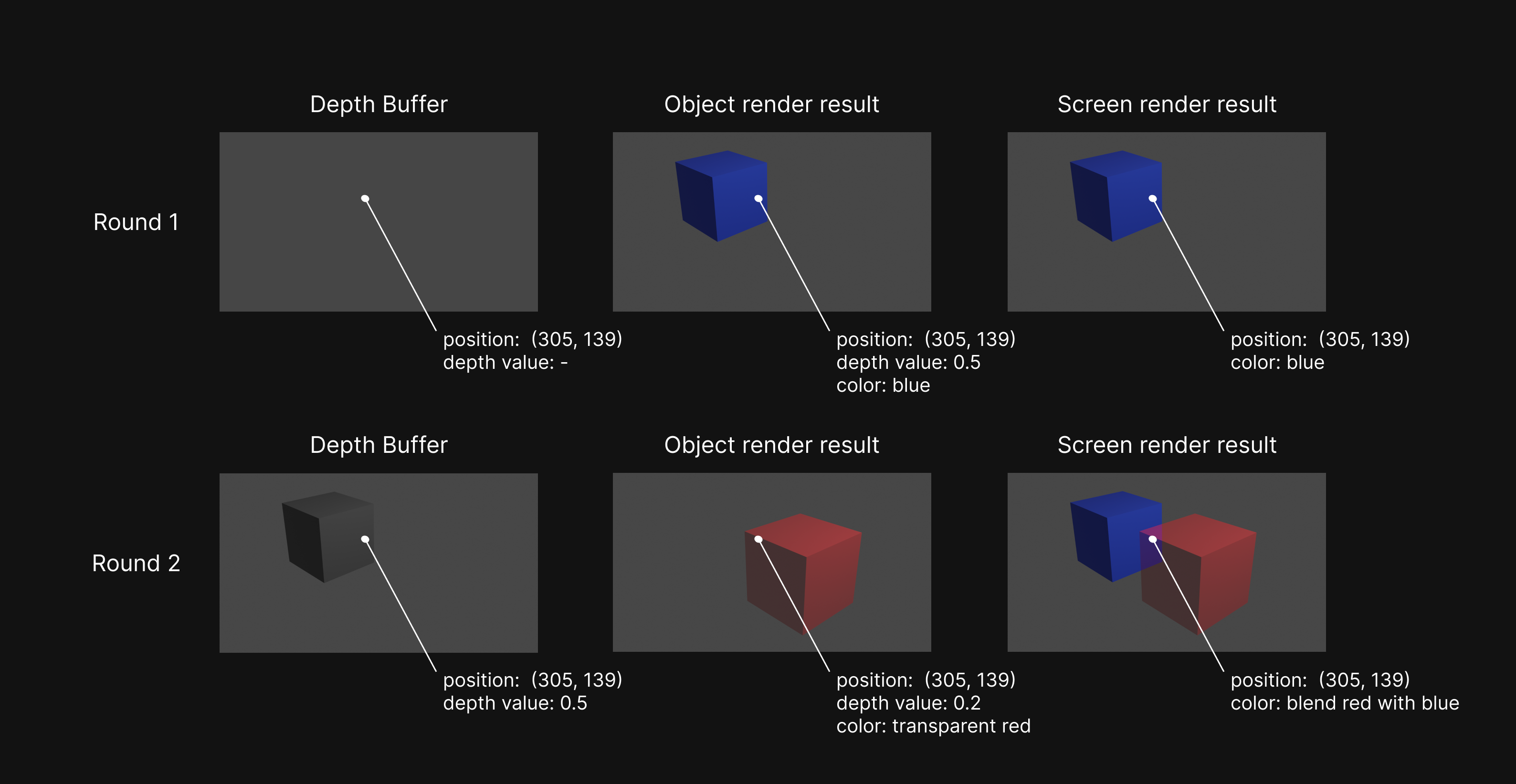
Everything looks good. You can see the overlap section. The colors are blended into purple. But, I want to show you what happens if I render the red block before the blue.
From the result, the blue color isn’t blended because, in the second rendering, the value in the Depth Buffer is less than the depth of the blue block. It means the new pixel is farther from the screen. So, the rendering is completely ignored, leaving only the color from the first rendering.
So, When you handle with transparent, Be careful with rendering order. You should always render objects from the farthest objects to the nearest objects to avoid bugs like above.
Self blending
From the previous section, you already understand how WebGL blends the intersection part of a transparent object and an opaque object. But, In common, when looking at transparent objects, you don’t only see the objects behind them but also see the back surface of them. Look at the image below.
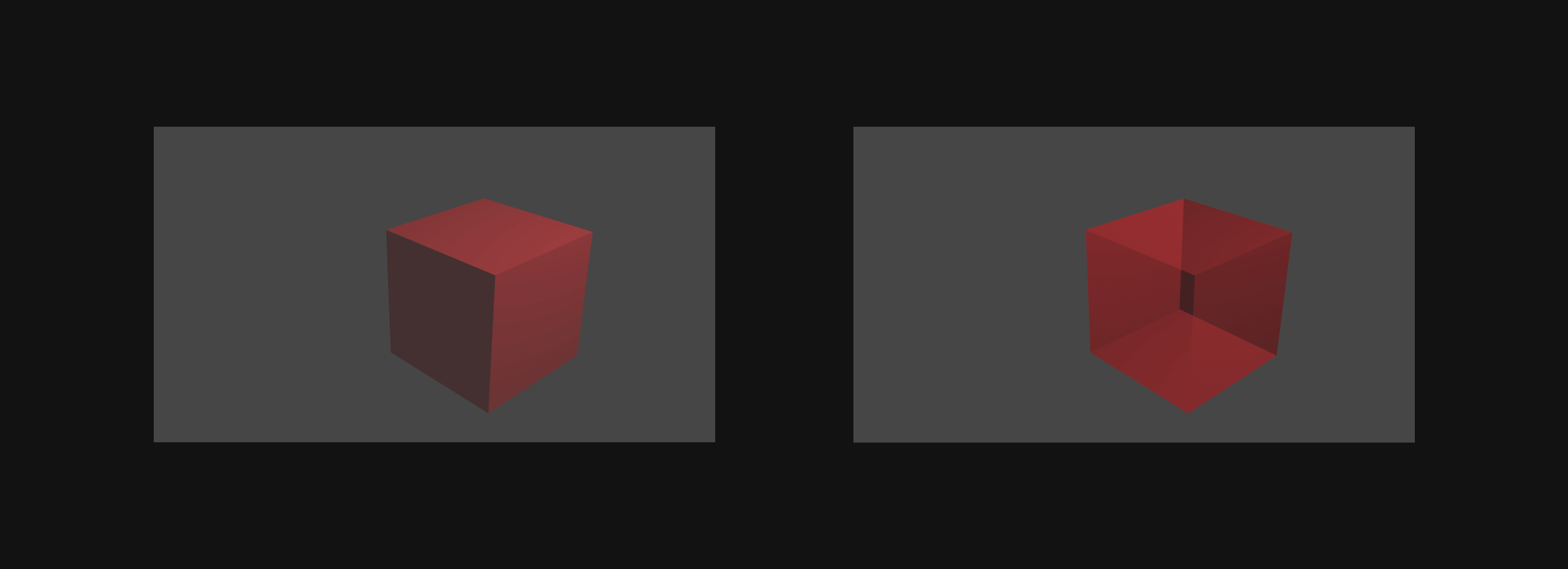
So, if you want WebGL to render the image at the right, all you have to do is render the inside and outside of the object surface separately. Like this.
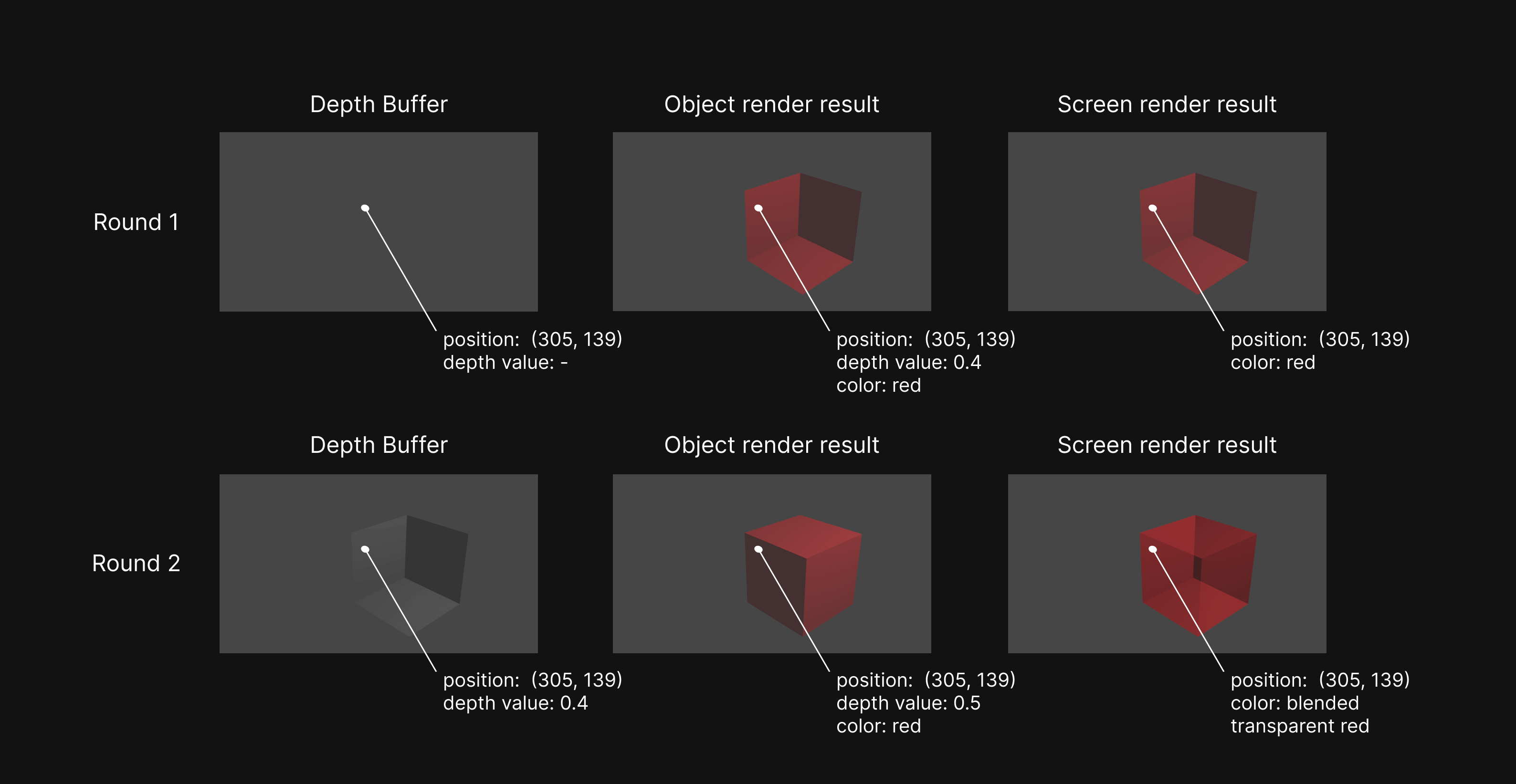
As you can see from the image, just render the inside and outside as 2 objects separately. And, you will get the desired result.
ThreeJS rendering order
Now, it’s time for ThreeJS and code. From the previous section, you already know that rendering order is important when it comes to transparent rendering.
So, I want to introduce you to the object rendering order behavior in ThreeJS first.
In ThreeJS, objects can be divided into 3 types opaque, transmissive, and transparent.
By default, opaque objects always be rendered first then transmissive objects and transparent.
Below is the ThreeJS sorting logic code over 3 types of objects.
function sort(customOpaqueSort, customTransparentSort) {
  if (opaque.length > 1) opaque.sort(customOpaqueSort || painterSortStable)
  if (transmissive.length > 1)
    transmissive.sort(customTransparentSort || reversePainterSortStable)
  if (transparent.length > 1)
    transparent.sort(customTransparentSort || reversePainterSortStable)
}
For opaque object sorting, ThreeJS uses the function below to sort opaque objects.
function painterSortStable(a, b) {
  if (a.groupOrder !== b.groupOrder) {
    return a.groupOrder - b.groupOrder
  } else if (a.renderOrder !== b.renderOrder) {
    return a.renderOrder - b.renderOrder
  } else if (a.material.id !== b.material.id) {
    return a.material.id - b.material.id
  } else if (a.z !== b.z) {
    return a.z - b.z
  } else {
    return a.id - b.id
  }
}
groupOrder is renderOrder property of the group of objects.
renderOrder is a user-defined value. You can set it on every Object3D class base variable. The default value is 0.
material.id is a number value property in the Material class. Every time you instantiate new material, you will get material with a new id.
The default value is 0 and keep increasing by 1 every time new material is instantiated
z is the distance from the center of the object to the screen.
id is like material.id. Every time you create a new 3D Object base class such as Mesh, this value will increase.
if you create 10 meshes, you will get meshes with id from 0 to 10.
As you can see when ThreeJS compares two opaque objects. it will compare groupOrder, renderOrder,
material’s id, distance from the screen, and object’s id, respectively, and sort from low to high.
For transmissive and transparent objects, it uses the function below.
function reversePainterSortStable(a, b) {
  if (a.groupOrder !== b.groupOrder) {
    return a.groupOrder - b.groupOrder
  } else if (a.renderOrder !== b.renderOrder) {
    return a.renderOrder - b.renderOrder
  } else if (a.z !== b.z) {
    return b.z - a.z
  } else {
    return a.id - b.id
  }
}
As you can see, For transmissive and transparent objects, sorting logic is almost the same as opaque.
Except, it skips on the material’s id sorting and sorts distance from the screen from high to low (far to near) instead.
Now, I think you understand how ThreeJS sorts objects for rendering and be ready for the next section.
ThreeJS implementation
In this section, I will show how to actually do transparency in ThreeJS.
import * as THREE from 'three'
import { OrbitControls } from 'three/addons/controls/OrbitControls.js'

const scene = new THREE.Scene()
const width = window.innerWidth
const height = window.innerHeight
const camera = new THREE.PerspectiveCamera(75, width / height, 0.1, 1000)
camera.position.z = 2
camera.position.y = 1
camera.lookAt(new THREE.Vector3())

const renderer = new THREE.WebGLRenderer()
renderer.setSize(width, height)
renderer.pixelRatio = window.devicePixelRatio ?? renderer.pixelRatio

document.body.appendChild(renderer.domElement)
const controls = new OrbitControls(camera, renderer.domElement)

const light = new THREE.PointLight('white', 20, 10)
light.position.z = 2
light.position.y = 1

scene.add(light)

const redMaterial = new THREE.MeshStandardMaterial({
  color: 'red',
  opacity: 0.5,
  transparent: true,
})
const blueMaterial = new THREE.MeshStandardMaterial({
  color: 'blue',
  opacity: 0.5,
  transparent: true,
})

const geometry = new THREE.BoxGeometry(1, 1, 1)

const redMesh = new THREE.Mesh(geometry, redMaterial)
redMesh.rotation.y = Math.PI / 4
const blueMesh = new THREE.Mesh(geometry, blueMaterial)
blueMesh.rotation.y = Math.PI / 4
blueMesh.position.z = -1
blueMesh.position.x = -1

scene.add(redMesh, blueMesh)

function render() {
  renderer.render(scene, camera)
  window.requestAnimationFrame(render)
}

render()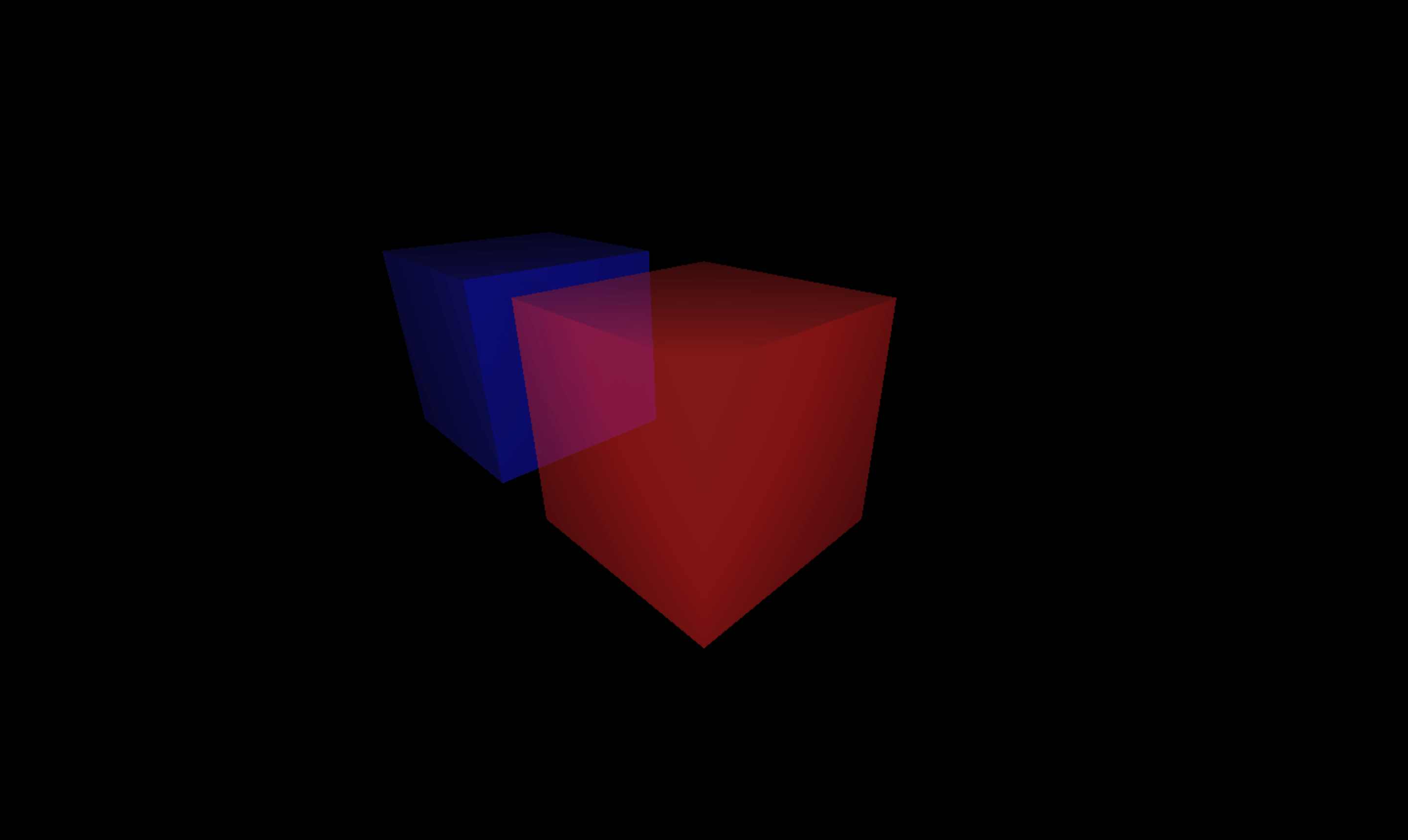
Everything looks cool. ThreeJS handle everything for you in this case. But, you can try setting render order of red box to be render before blue box to reproduce the bug in
The importance of rendering order section.
redMesh.renderOrder = 1
blueMesh.renderOrder = 2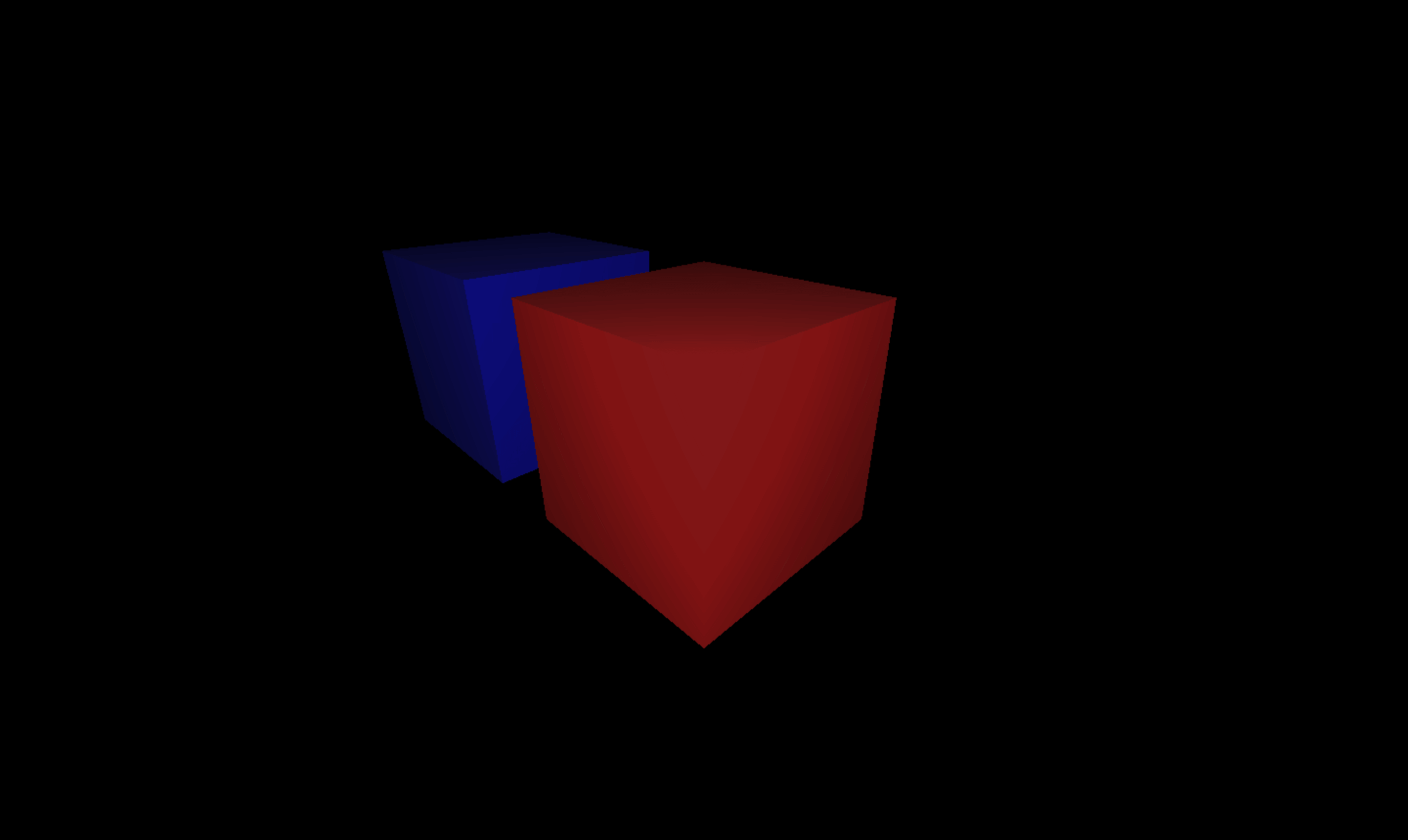
ThreeJS self blending
To do self blending, you have to force ThreeJS to render inside and outside.
You can do it like this.
const redMaterial = new THREE.MeshBasicMaterial({
  color: 'red',
  opacity: 0.3,
  transparent: true,
  side: THREE.DoubleSide, // set side to Double
})
const blueMaterial = new THREE.MeshBasicMaterial({
  color: 'blue',
  opacity: 0.5,
  transparent: true,
  side: THREE.DoubleSide, // set side to Double
})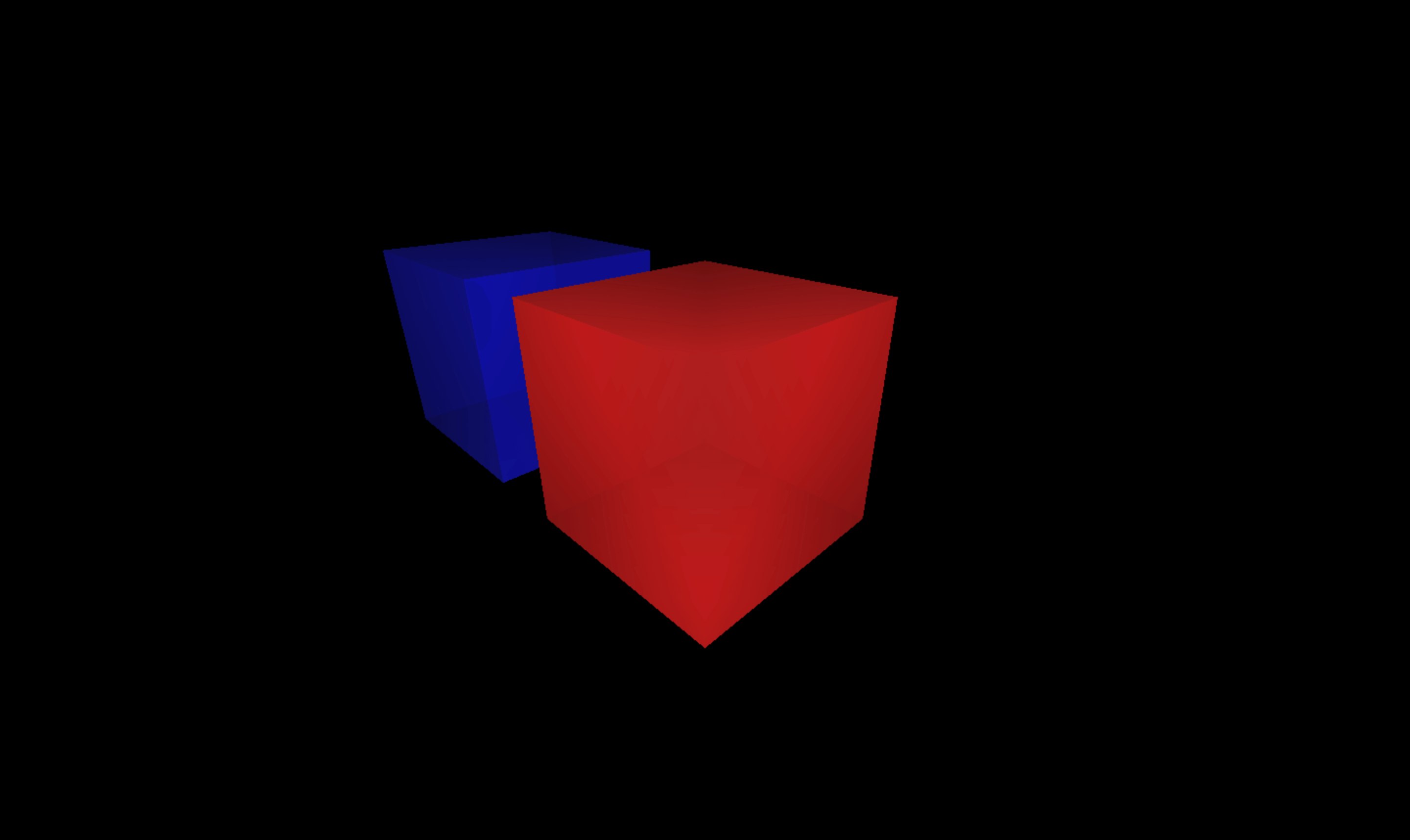
When ThreeJS detect that an object is double side and transparent, it will automatically render the object 2 times.
Let’s see the code in ThreeJS project.
if (
  material.transparent === true &&
  material.side === DoubleSide &&
  material.forceSinglePass === false
) {
  material.side = BackSide // render back side at first time
  material.needsUpdate = true
  _this.renderBufferDirect(camera, scene, geometry, material, object, group)

  material.side = FrontSide // render front side at first time
  material.needsUpdate = true
  _this.renderBufferDirect(camera, scene, geometry, material, object, group)

  material.side = DoubleSide
} else {
  _this.renderBufferDirect(camera, scene, geometry, material, object, group)
}
ThreeJS same position bug
Sometimes, you may want to render 2 transparent objects inside of each other. And, you may do something like this.
const redMaterial = new THREE.MeshStandardMaterial({
  color: 'red',
  opacity: 0.5,
  transparent: true,
  side: THREE.DoubleSide,
})
const blueMaterial = new THREE.MeshStandardMaterial({
  color: 'blue',
  opacity: 0.5,
  transparent: true,
  side: THREE.DoubleSide,
})

const geometry = new THREE.BoxGeometry(1, 1, 1)

const redMesh = new THREE.Mesh(geometry, redMaterial)
redMesh.rotation.y = Math.PI / 4
const blueMesh = new THREE.Mesh(geometry, blueMaterial)
blueMesh.rotation.y = Math.PI / 4
// move blue mesh to position 0,0,0 and scale it down to 0.6
blueMesh.scale.x = 0.6
blueMesh.scale.y = 0.6
blueMesh.scale.z = 0.6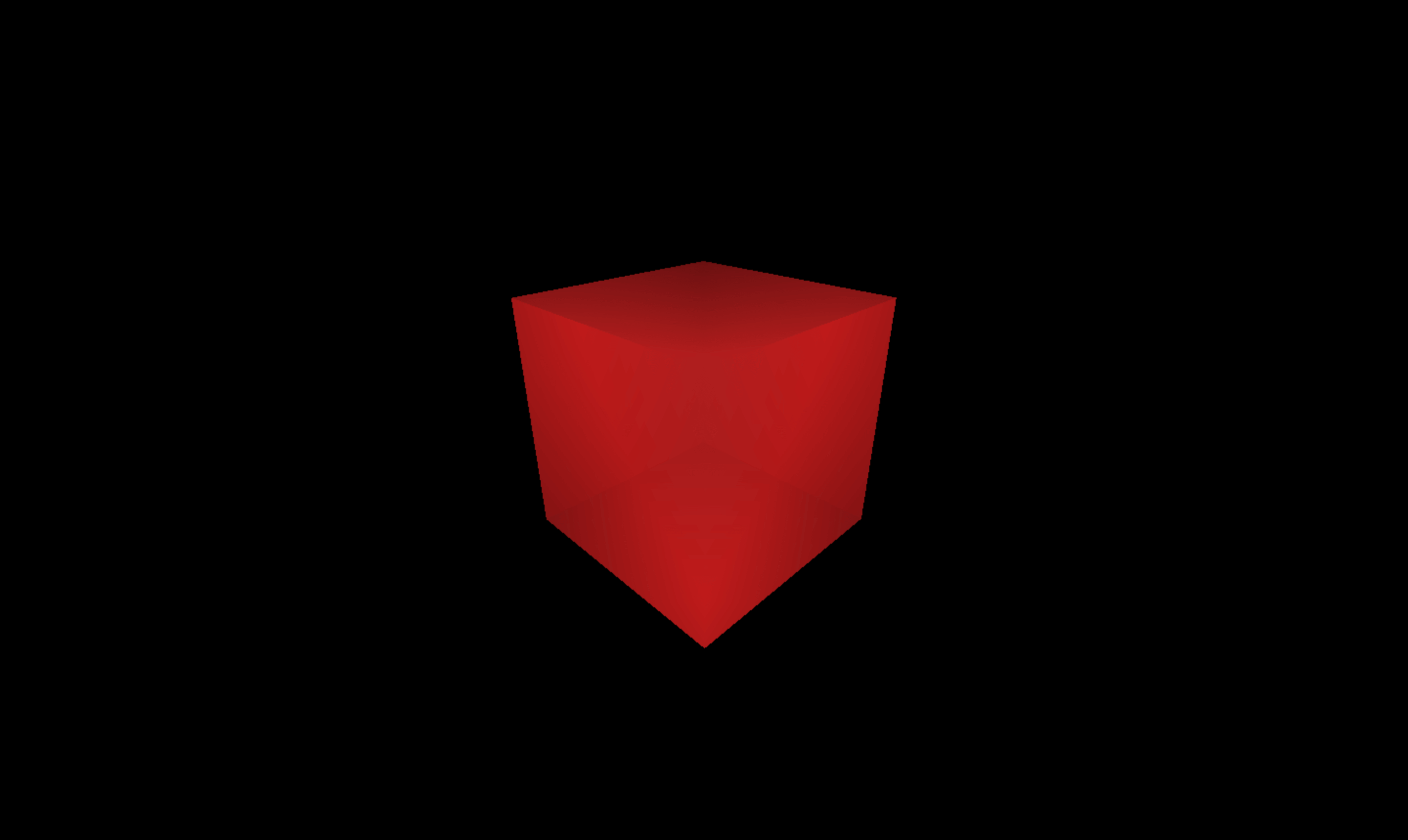
You can see that the blue box has completely disappeared. The reason is that at this moment,
both objects have almost every sorting property the same value groupOrder, renderOrder, material.id, and z (objects are at the same position. So, z will be the same).
There’s only one property id that is still different. In this case, redMesh is instantiated before blueMesh.
So, redMesh’s id will be less than blueMesh and will be rendered first. Then, blueMesh rendering will be ignored due to depth testing failure.
So, to solve this problem. You have to render each object manually both inside and outside in the correct order like this.
inside of red mesh
inside of blue mesh
outside of blue mesh
outside of red mesh
Let’s see the code.
renderer.autoClear = false // prevent depth map and sceen clearing before rendering
// ...
function render() {
  blueMaterial.side = THREE.BackSide
  redMaterial.side = THREE.BackSide
  redMaterial.renderOrder = 1 // render red mesh first at the first round
  blueMesh.renderOrder = 2
  renderer.render(scene, camera)

  redMaterial.renderOrder = 2
  blueMesh.renderOrder = 1 // render blue mesh first at the second round
  blueMaterial.side = THREE.FrontSide
  redMaterial.side = THREE.FrontSide
  renderer.render(scene, camera)

  window.requestAnimationFrame(render)
}
//...
So, From the code, I just disable screen clearing and manually render objects in the correct order. You can check out my code at github.com/note-space-demo/transparency-in-threejs..
That’s all. I trust this note provides clarity on the concept of transparency in WebGL and ThreeJS. Until next time!